



Tap a part or a name to read its spec
It pulls the pieces from the system
Real components from your library, with their props and states.
Tokens, components, Figma and clean React and Vue code, served to your AI through the Orvain MCP. Every screen it makes is 100% Orvain.
Build Relay's dispatch console: the live Amsterdam map, couriers on the road, deliveries per hour and who's running late
The metric card your designer drops in from Figma, the one you import from npm and the one your AI builds through the MCP are the same component, made of the same tokens. So is every one of the 600+ blocks built from it. Nothing is redrawn or reinterpreted along the way.
Weekly goal
Weekly goalWeek 43 · Analytics
42m+18%7 days0of 12,000 sessions
Layers
Weekly goal
Header
Progress
Dial
Weekly goalMain component
Layout
Variables
Your team +4Samand your agents build from one system: the same components Buttonthe same tokens #59EAA9and the same layout rules, from Figma Gap 6Gap 12Mayato production UI.
Your team and your agents build from one system: the same components the same tokens and the same layout rules, from Figma to production UI.
Claude Code, Cursor or any MCP client asks Orvain for the real components, tokens and layout rules, then hands you typed code that already passed the checks.
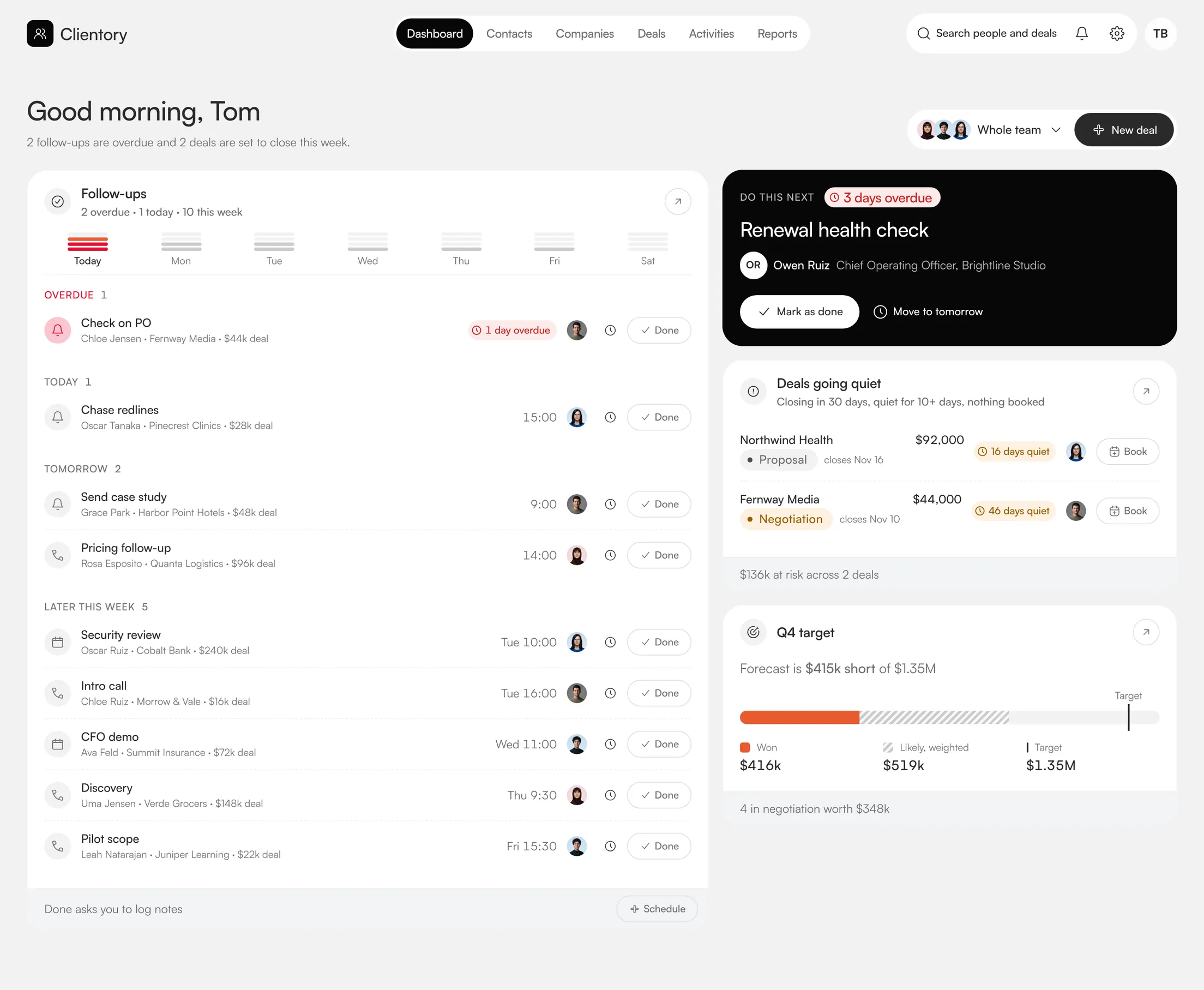
Build Clientory's sales dashboard with Orvain.
Tap a part or a name to read its spec
Real components from your library, with their props and states.

Your colours, radius and type, through tokens. Nothing hard-coded.

Layout rules set the grid, the order and the spacing.
Six products, every screen put together by the Orvain MCP from our own components, tokens and layout rules. Nothing drawn by hand, nothing invented. Pick one, then open any of its pages.
One Figma file and one codebase, mirrored part for part, and an MCP that hands all of it to your agent.
Real, tested blocks for every screen you build. Swipe through, tap one to open it.
Three steps from install to shipped page: add the system, connect the agent you already use, then compose screens from blocks without leaving your editor.
A system built for the way you ship today.
and your React or Vue project is set up for Orvain components
Three steps from install to shipped page: add the system, connect the agent you already use, then compose screens from blocks without leaving your editor.
Install the system
A system built for the way you ship today.
and your React or Vue project is set up for Orvain components
Connect your agent
Wire Orvain into the agent you already use.
with your licence key, and Claude, Cursor or Copilot can read every component and token
Ship the page
Compose blocks without leaving your editor.
and ship a production-ready page on your next commit
The free components are on npm today. A plan adds every block, the MCP server and the Figma file.
Secure checkout with Stripe. Instant access.
Why pick Orvain over shadcn or Radix?
Pick Orvain UI if you need a Figma library that matches the code, Vue as well as React, and a hosted MCP server your AI tools can query. shadcn/ui is a free copy-paste collection where you own every line, and Radix gives you unstyled primitives; both are good choices. Orvain adds white-label tokens from one config file and one component contract shared by Figma, code and the MCP server.
What is an MCP server, exactly?
An MCP server gives AI tools structured “tools” to call over the Model Context Protocol, an open standard. Orvain’s hosted server at mcp.orvain.dev exposes the component library (props, variants, tokens and patterns), so any MCP-aware assistant queries the real source instead of guessing from training data.
Which AI tools are supported?
Anything that speaks MCP: Cursor, Claude Code, Windsurf and GitHub Copilot in VS Code, plus a drop-in adapter for v0. Connecting is a single config entry pointing at mcp.orvain.dev, with your licence key.
How do you guarantee “0 hallucinated props”?
By checking before writing. Every generation is validated against the live component schemas, so props that don’t exist, missing required variants and invented imports are rejected before code is written, and the agent corrects itself against the real API.
Does this work with my own theme?
Yes. White-label tokens resolve from one config file. Change it once and every generation after that follows your brand: colors, radii, spacing and type.
Will it bloat my bundle?
No. Orvain UI components are tree-shakeable, RSC-safe and strictly typed, and the core ships under 12 kB gzipped. Importing one component does not pull the rest of the library into your bundle.
Why pick Orvain over shadcn or Radix?
Pick Orvain UI if you need a Figma library that matches the code, Vue as well as React, and a hosted MCP server your AI tools can query. shadcn/ui is a free copy-paste collection where you own every line, and Radix gives you unstyled primitives; both are good choices. Orvain adds white-label tokens from one config file and one component contract shared by Figma, code and the MCP server.
What is an MCP server, exactly?
An MCP server gives AI tools structured “tools” to call over the Model Context Protocol, an open standard. Orvain’s hosted server at mcp.orvain.dev exposes the component library (props, variants, tokens and patterns), so any MCP-aware assistant queries the real source instead of guessing from training data.
Which AI tools are supported?
Anything that speaks MCP: Cursor, Claude Code, Windsurf and GitHub Copilot in VS Code, plus a drop-in adapter for v0. Connecting is a single config entry pointing at mcp.orvain.dev, with your licence key.
How do you guarantee “0 hallucinated props”?
By checking before writing. Every generation is validated against the live component schemas, so props that don’t exist, missing required variants and invented imports are rejected before code is written, and the agent corrects itself against the real API.
Does this work with my own theme?
Yes. White-label tokens resolve from one config file. Change it once and every generation after that follows your brand: colors, radii, spacing and type.
Will it bloat my bundle?
No. Orvain UI components are tree-shakeable, RSC-safe and strictly typed, and the core ships under 12 kB gzipped. Importing one component does not pull the rest of the library into your bundle.
The MCP server is the killer feature. Cursor finally suggests our real props instead of inventing ones.
Join the Orvain Dispatch and get production-ready components, free to keep: React and Vue code plus the Figma frame, yours to ship.